TruckMap - Truck GPS Routes
- 4.3
- Rating
- 500.00K
- Installs
- Free
- Price

 Analysis by App-foxy
When a route looks simple on a regular map, it can become a very different problem behind the wheel of a truck. Low clearances, restricted roads, awkward delivery entrances, and streets that are perfectly fine for a car can turn a short trip into a stressful detour. I tested TruckMap - Truck GPS Routes with that starting point in mind: not as another general map, but as a navigation tool aimed at people who need truck-aware planning.
My first impression is that it makes the most sense for professional drivers, owner-operators, and anyone who regularly moves a larger vehicle through unfamiliar areas. It is a free Maps & Navigation app from Tenstreet, rated for Everyone, and its focus is clear from the moment you open it: the route matters not only because it reaches the destination, but because the vehicle should be able to use the roads along the way.
From an ordinary destination to a truck-ready route
The useful workflow begins before the vehicle moves. Instead of entering an address and immediately trusting the fastest-looking line, I treat the destination as the first part of a delivery plan. A warehouse address may point to a main entrance, while the actual truck entrance is around the side. A retail location may sit on a narrow urban road where the final approach is more difficult than the highway portion. TruckMap is most valuable when I use it to think through that entire approach rather than only the final mileage.
You May Also Like

 Blood Strike: 2.5 Anniversary
Blood Strike’s Loadouts Turn Every Drop Into a Tactical Gamble
A close look at Blood Strike’s custom loadouts: how fast access to signature weapons reshapes its battle royale rhythm, rewards preparation, and narrows the gap between fights.

 Pandora - Music & Podcasts
Pandora’s Music Is Easy to Start, but Harder to Recover
Pandora’s strength is its low-effort path from a seed to a station. Its weak spot is how much confidence it asks you to place in connection, setup, and quiet recovery.

 8 Ball Pool
 Is Built on Rivalries, Rematches, and Routine
A close look at the rivalries, rematches, shared routines, and unanswered safety questions that turn a quick pool match into a persistent mobile community.

 Samsung Music
’s Quiet Strength Is Playing What You Already Own
Its reach comes less from spectacle than from dependable access to a personal library. That simplicity is both the app’s strongest retention engine and its ceiling.

 AccuWeather: Weather Radar
AccuWeather Review: A Quick, Clear Forecast for Everyday Decisions
For everyday plans, the best forecast is the one you can understand quickly. AccuWeather makes rain timing, radar, and local conditions easy to act on, with a few trade-offs.

 Hill Climb Racing
Why Hill Climb Racing Still Turns Crashes Into One More Run
A tiny car, a bumpy hill and one more upgrade: Hill Climb Racing keeps resurfacing because its simple chaos makes every near-miss feel personal.
More From Our News Desk



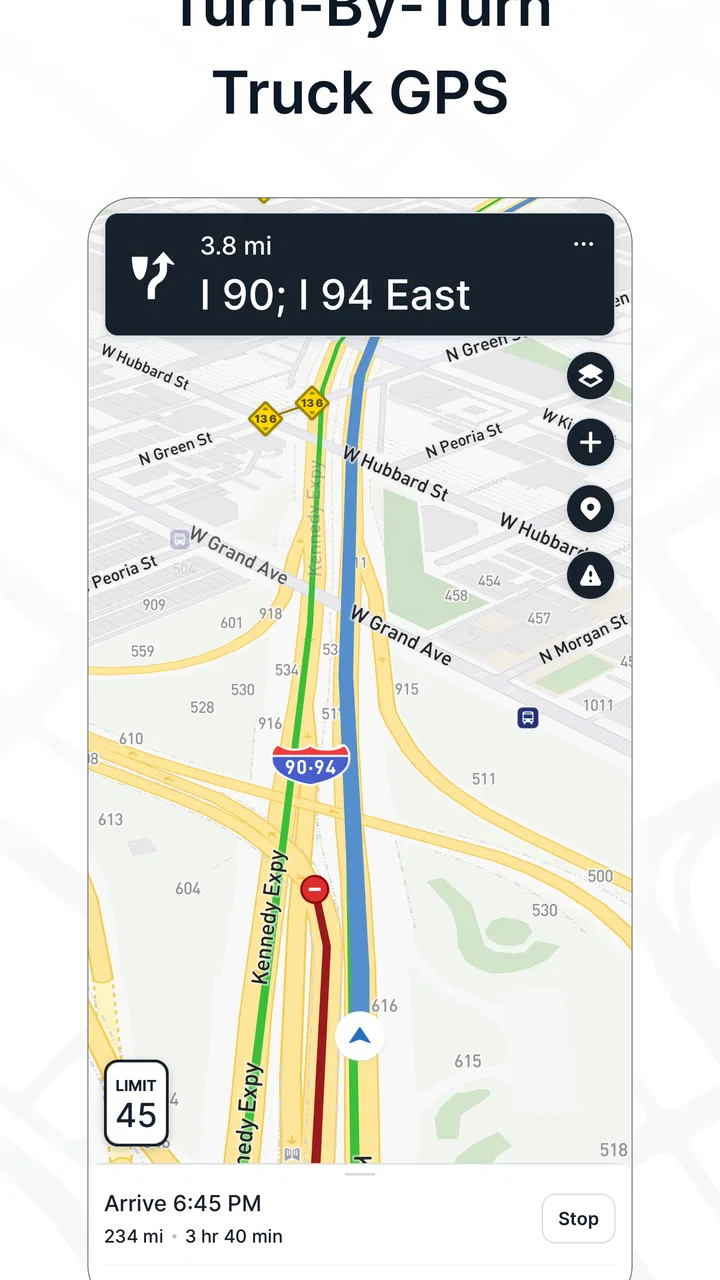
I start by entering the destination and checking the proposed route with the vehicle in mind. This is the key difference from relying only on a normal car-navigation app. A car-focused route can prioritize speed or distance without giving enough attention to whether a truck can safely follow every section. With a truck-oriented tool, the planning question changes from “Which road is fastest?” to “Which practical route gets me there without creating a clearance, access, or turning problem?”
That distinction is especially helpful for drivers who are new to an area. If I already know a city well, I may remember the roads that work for my vehicle. In an unfamiliar place, however, memory is not available, and a route that looks reasonable on a screen may become difficult when the road narrows or the destination sits behind a complicated entrance. The app gives that first planning pass a more appropriate context.
The important habit is to review the route before pulling away, not after a restriction has already become a problem. I would still compare the suggested path with road signs, local instructions, and the delivery information supplied by the customer. Navigation can support judgment, but it should not replace the driver’s responsibility to confirm the route is suitable for the exact vehicle and load.
How I use it during a normal delivery day
A realistic example is a morning delivery to a business park outside a city. I know the general area, but not the final streets, and the receiving location has given me an address rather than detailed driving instructions. I enter the destination while parked, inspect the route, and look for the point where the truck will leave the larger roads. That transition is where I pay the most attention, because the last part of a route often contains the tightest turns, local restrictions, and confusing entrances.
On the way, I use the app as a guide rather than staring at the screen continuously. The goal is to receive enough direction to stay on the planned path while keeping my attention on traffic, signs, mirrors, and the space around the vehicle. If the route changes because of a missed turn or a road closure, I pause when it is safe and reassess instead of making a sudden maneuver simply to follow a recalculated instruction.
At the destination, the workflow does not necessarily end at the street address. I may need to pass the address and use a designated truck entrance, circle the property, or call the receiving contact for the correct gate. This is where a navigation app hands off to real-world information. TruckMap can help me reach the area, but the customer’s instructions and visible site signage still determine the final movement through private property.
Where the handoffs matter most
Truck navigation is rarely a single-person, single-screen process. A dispatcher may send an address, a customer may provide a gate number, and a driver may discover that the practical entrance differs from the postal address. I find the app most useful when it sits between those pieces of information: it turns the destination into a road plan, while the driver and the people at the destination fill in the details that a map cannot know.
For a small fleet, that handoff can make route discussions clearer. A driver can review the suggested path before departure and raise a concern while there is still time to adjust. For an independent driver, the same process helps separate two questions that are often mixed together: whether the road network can take the truck near the destination, and whether the property itself can receive it.
I would not treat the app as proof that a particular loading dock, yard, or private driveway is suitable. That is a practical limitation of any navigation tool. The best workflow is to use TruckMap for the public-road portion, then confirm the last approach with the shipper or receiver when the location is unfamiliar. This is one of the most useful ways to avoid a preventable arrival problem.
What the truck-focused approach changes
Compared with a usual phone map designed for everyday drivers, the main advantage here is the intended perspective. A general map is excellent for finding businesses, checking traffic, walking around a city, or guiding a passenger car. It may still be useful alongside TruckMap, particularly when I need broader place information or a second look at the destination. But it is not automatically the best tool for deciding whether a truck should use a particular road.
That does not mean I would remove a regular map from my phone. I see the two types of apps as complementary. A general map can help identify a business entrance or nearby service, while TruckMap can be the first choice for the road journey itself. Switching between them is an extra step, but it is often more sensible than asking one app to handle every part of a commercial delivery.
The trade-off is that a truck-oriented route may not always look like the quickest route a car app would choose. A driver who is focused only on arrival time may find that frustrating. For me, the extra planning is justified when avoiding an unsuitable road is more important than shaving a few minutes from the trip. The value is not simply in drawing a line on the screen; it is in making the line more relevant to the vehicle using it.
Small workflow choices that make a difference
One practical tip is to enter the destination while stopped and review the final approach at a useful zoom level. Looking only at the broad route can hide the part that requires the most judgment. I also prefer to identify a safe place to stop before the final turn if I expect to call the receiver or verify an entrance. That prevents the common mistake of trying to solve an address problem in moving traffic.
A second tip is to keep the route as one input into the day’s plan rather than assuming it covers every operational detail. If a dispatcher changes the delivery order, I would recheck the next destination instead of relying on an earlier route. If the truck configuration changes, such as a different trailer or load, I would also be more cautious about accepting a route without reviewing it again.
A third insight is that the final approach deserves its own handoff note. When I receive useful information from a customer—such as a gate location, a preferred entrance, or a warning about a narrow access road—I would keep that information with the delivery instructions rather than expecting the navigation screen to remember the context. The app handles route guidance; human notes handle site-specific knowledge.
These habits sound simple, but they change the outcome. They reduce the chance that a driver follows a route perfectly while still arriving at the wrong side of a property or discovering too late that the address is not the entrance used by trucks. TruckMap works best when it supports this preparation instead of being treated as an automatic answer to every routing question.
What I noticed about everyday usability
The app is available at no cost, which makes it easy to try before deciding whether it fits a regular driving routine. Its current version is 4.88.0, and it has built a sizeable user base, with more than half a million installs. The average rating is 4.3 from roughly eight thousand ratings, alongside about four thousand written reviews. Those figures suggest that the app has meaningful adoption, but they do not remove the need to test it with a particular vehicle, region, and working style.
I appreciate that the product has a focused identity instead of presenting itself as a universal solution for every type of travel. Its category is Maps & Navigation, but the truck emphasis gives it a more specific job. That makes the learning curve easier to understand: I am not opening it primarily for restaurant discovery or walking directions; I am opening it to plan and follow a route with commercial-vehicle concerns in mind.
The age rating of Everyone also makes it straightforward to consider for a broad range of users. The more important question is not age but responsibility. A casual driver of a small car may gain little from choosing this over a familiar general map, while a professional driver may find the truck-centered approach much more relevant.
Where the flow can break
No navigation app should be followed blindly, and TruckMap is not an exception. The route can be sensible at the public-road level while the destination itself remains difficult. Temporary construction, newly posted restrictions, weather, local events, and instructions from a site manager can all change the practical choice. A driver should be ready to reject a route when conditions on the ground disagree with the screen.
Another point of friction is the need for concentration. Truck navigation is helpful only when it reduces workload rather than becoming another distraction. Entering a new destination, checking a reroute, or comparing alternatives should happen while parked or with another person handling the phone. If the app requests attention at the wrong moment, the safe response is to wait, not to interact while driving.
There is also a difference between route suitability and route preference. The app may help avoid obvious problems associated with truck travel, but drivers still need to consider fuel stops, legal driving limits, delivery appointments, rest planning, and the specific dimensions of their vehicle. Those decisions belong in the wider trip plan. TruckMap can be the road-navigation layer without being the entire operating system for a haul.
I would be cautious about depending on it alone for a high-consequence trip through an unfamiliar area. For a first visit to a difficult site, I would keep the receiver’s phone number, written directions, and a backup map option available. That is not a criticism unique to this app; it is a sensible safeguard whenever a digital route meets a complex physical location.
Who should use it, and who should choose something else?
I recommend giving TruckMap a serious trial if you drive a truck regularly and have grown tired of car-oriented routes that ignore the realities of commercial driving. It is particularly suitable for independent drivers who need a practical starting point for unfamiliar destinations, and for small operations where the driver personally manages both route planning and delivery execution.
I would be less enthusiastic for someone who only needs occasional directions in a passenger car. A regular map may be quicker for searching places, checking live local context, or navigating a mixed day of driving and walking. Likewise, a large fleet with a full dispatch and telematics system may need broader operational tools than a navigation-focused mobile app can provide. In that setting, TruckMap could still be useful to an individual driver, but it may not replace the company’s established workflow.
The right choice also depends on how carefully the driver verifies the last mile. If you want an app that makes every decision for you, this is not the right expectation. If you want a truck-aware route to examine before and during a trip, while remaining responsible for signs, restrictions, and site instructions, it is a much better fit.
My final assessment after following the full route
TruckMap - Truck GPS Routes succeeds because it addresses a real gap between ordinary navigation and the way truck journeys actually work. The strongest result comes from using it from input to outcome: receive the destination, inspect the truck-suitable route, confirm the difficult handoff points, follow the public-road guidance carefully, and then finish with the receiver’s instructions at the property.
It is not a substitute for professional judgment, and I would not use any navigation app as permission to ignore a sign or force a turn. Its limitations become manageable when I treat the route as informed guidance rather than an unquestionable command. Used that way, the app can reduce uncertainty before the truck reaches the streets where mistakes are hardest to correct.
My recommendation is straightforward: try it if your everyday driving involves deliveries, unfamiliar roads, or a vehicle that cannot simply follow the same route as a car. Keep a general map as a companion for broader place information, and keep human confirmation for the final entrance. For the right driver, the biggest benefit is better preparation before the difficult part of the journey begins.
FAQs for TruckMap - Truck GPS Routes
01What features does TruckMap offer for truck drivers?
TruckMap provides specialized features for truck drivers, including optimized GPS routes that account for truck restrictions, weight limits, and road closures. It also offers real-time traffic updates, fuel pricing information, and rest area locations. These features are designed to enhance the safety and efficiency of truck driving.
02Is TruckMap compatible with both Android and iOS devices?
Yes, TruckMap is available for download on both Android and iOS platforms. Users can easily find it on the Google Play Store for Android devices and the App Store for iOS devices. The app is designed to work seamlessly across various devices, ensuring a reliable user experience.
03Does TruckMap require an internet connection to function?
TruckMap requires an internet connection to access real-time traffic updates and map data. However, it does offer offline maps, allowing users to download routes in advance. This feature can be particularly useful in areas with poor connectivity, ensuring continuous navigation support.
04Are there any costs associated with using TruckMap?
TruckMap is free to download and use, but it may offer in-app purchases or premium features. These premium options might include advanced route planning tools or additional data services. It's advisable to review the app's pricing details to understand any potential costs before making purchases.
05How accurate and reliable is TruckMap's GPS and routing system?
TruckMap uses advanced algorithms to provide accurate and reliable routes tailored for trucks. It considers factors like road restrictions and traffic conditions. While generally reliable, users should remain aware of updates or temporary road changes and always use their judgment in conjunction with the app's guidance.
Pros
- User-friendly interface for easy navigation.
- Real-time traffic updates enhance route planning.
- Supports truck-specific routing and restrictions.
- Offline maps available for areas with poor signal.
- Includes fuel prices and truck stop locations.
Cons
- Requires a stable internet for best experience.
- Limited customization options for route preferences.
- Occasional map inaccuracies in remote areas.
- Battery consumption can be high during use.
- Some features locked behind a subscription.

TruckMap - Truck GPS Routes
Gallery